Morse Code Translator Tool

Free Morse Code Generator & Translator

Instantly convert text to Morse code and decode Morse code to text with this free Morse code generator and translator. Generate Morse code audio, adjust pitch and speed, download as WAV, and copy Morse code instantly. Perfect for developers, radio operators, cybersecurity learners, and Morse code practice.

  • Text ↔ Morse code converter
  • Morse code audio generator
  • Download Morse code as WAV
  • Fast, secure, and browser-based
Morse code generator converting text to Morse code with audio and live preview
Morse code live generator preview · · · — — —
Morse Code Generator & Converter
Convert text ↔ morse code, play audio, and export as WAV.
How Morse Code Generator works

Convert text and Morse code in 3 simple steps

Easily convert text to Morse code or decode Morse code into readable text. Play audio signals, copy results, or download Morse code instantly.
1
Enter text or Morse code
Type your message or paste Morse code into the generator input field.
2
Convert instantly
The tool converts text to Morse code or decodes Morse code into readable text instantly.
3
Play, copy, or download
Listen to Morse audio, copy the result, or download the Morse code as a WAV file.
Why use Morse Code Generator

Benefits & Use Cases of Morse Code Generator & Converter

Convert text to Morse code, decode Morse signals, play Morse audio, and download instantly. Perfect for learning, communication, emergency signaling, and development projects.
Learn Morse Code
Practice and learn Morse code easily by converting text into dots and dashes instantly.
Encode & Decode Messages
Convert text to Morse code or decode Morse signals into readable messages quickly.
Audio Morse Playback
Listen to Morse code audio signals to understand real communication patterns.
Download Morse Code
Export Morse code audio as WAV files for offline use, projects, or practice.
Useful for Developers
Generate Morse code for apps, tools, cybersecurity, and communication systems.
Instant & Private
Runs completely in your browser with instant conversion and no data storage.
Stats & Social Proof Section - WordPress

Trusted by thousands

Built for developers & teams

50+
Free tools
10k+
Users per month
100%
Browser-based
Free
No sign-up required

Frequently Asked Questions

Morse Code Generator FAQ

Learn how to convert text to Morse code, decode signals, generate audio, and use this professional tool for ham radio, cybersecurity, and learning.

What is Morse code and how does it work?

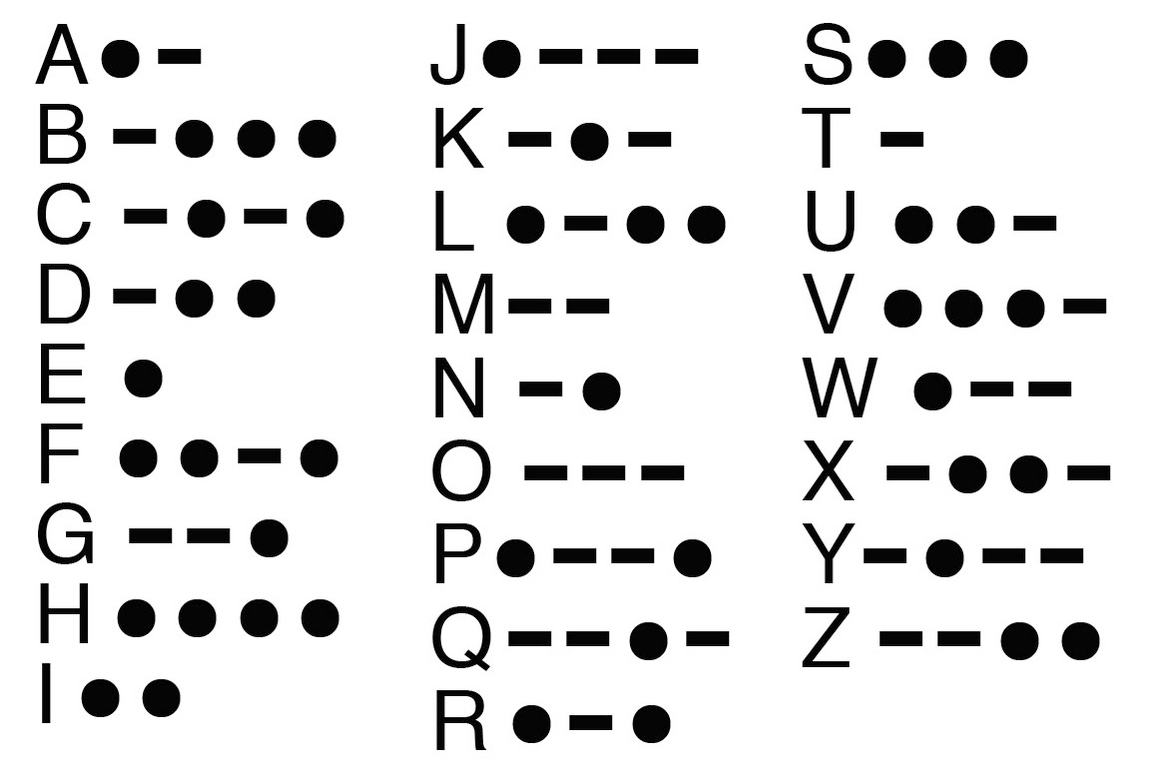
Morse code is a method of encoding text characters as standardized sequences of two different signal durations, called dots (short) and dashes (long). Developed by Samuel Morse in the 1830s, it was originally used for telegraph communication and remains relevant today for ham radio, aviation, and emergency signaling.

How do I convert text to Morse code using this generator?

Simply type or paste your text into the input field. The tool instantly converts it to Morse code using standard international Morse code (ITU-R M.1677-1). You can then copy the result, play it as audio, or download it as a WAV file.

Can I decode Morse code back to text?

Yes, this is a bidirectional Morse code translator. Enter Morse code using dots (.) and dashes (-) or spaces, and the tool will instantly decode it back to readable text. It supports both standard and non-standard spacing formats.

What is the standard Morse code format used?

We use International Morse Code (ITU-R M.1677-1), the global standard for telecommunications. This standard defines the timing: one dash equals three dots, space between parts of the same letter equals one dot, and space between letters equals three dots.

How do I play Morse code audio?

After converting text to Morse code, click the play button to hear the audio signal. You can adjust the pitch (frequency), speed (words per minute), and volume to match your learning needs or equipment requirements.

Can I download Morse code as an audio file?

Yes, click the download button to save your generated Morse code as a high-quality WAV file. This is perfect for offline practice, sharing with others, or using in presentations and training materials.

What speed should I set for learning Morse code?

Beginners should start at 5-10 words per minute (WPM). As you improve, gradually increase to 15-20 WPM. The Farnsworth method (slower character speed with normal spacing) is recommended for learning. Our tool supports 5-40 WPM adjustable range.

Is this Morse code generator free to use?

Yes, completely free with unlimited conversions and downloads. No registration, no ads, no watermarks. Use it for personal learning, ham radio practice, educational purposes, or professional communication training.

Do you store my Morse code messages or audio?

No. All processing happens client-side in your browser using Web Audio API. Your text, Morse code, and generated audio never leave your device. We have no servers storing your data, ensuring complete privacy.

Can I use this tool for ham radio license preparation?

Absolutely. This tool is designed for amateur radio operators preparing for FCC license exams (Technician, General, Extra). Practice copying Morse code at exam speeds (13 WPM for General, 20 WPM for Extra) with adjustable pitch and clear audio.

What characters does Morse code support?

Standard International Morse Code includes: A-Z letters, 0-9 numbers, and common punctuation (period, comma, question mark, exclamation, slash, equals, plus). Prosigns like SOS (... --- ...), AR (+), and SK (End of contact) are also supported.

How is this useful for cybersecurity and CTF competitions?

Morse code appears frequently in Capture The Flag (CTF) challenges, steganography puzzles, and cryptographic exercises. This tool helps cybersecurity students quickly decode Morse-encoded flags and understand historical encryption methods.

Can I use this on mobile devices?

Yes, the Morse code generator is fully responsive and works on iOS Safari, Android Chrome, and all modern mobile browsers. Generate and play Morse code on your phone or tablet anywhere, even without internet after page load.

What audio pitch (frequency) is best for Morse code?

The standard ham radio frequency is 600-800 Hz. Most operators prefer 700 Hz. Our tool allows 400-1200 Hz adjustment. Lower frequencies (400-500 Hz) are easier for beginners, while higher frequencies (800-1000 Hz) cut through noise better.

How do I copy Morse code with proper spacing?

The generator outputs standard format: dots and dashes with one space between characters, three spaces between words. Click the copy button to get clean text, or use the visual display with slash separators (/ ) between words for clarity.

Is Morse code still used today?

Yes, Morse code remains active in amateur radio (ham radio), aviation emergency beacons, assistive technology for disabled communication, and military applications. It's also popular in puzzles, escape rooms, and educational demonstrations of early communication technology.

Can I generate Morse code for SOS emergency signals?

Yes, type "SOS" or "... --- ..." to generate the universal distress signal. The tool produces the correct timing: three dots, three dashes, three dots, with proper spacing. You can play or download this for emergency preparedness training.

What is the difference between American and International Morse code?

We use International Morse Code (ITU standard), which is globally recognized. American Morse (Railroad Morse) is an older variant with different timing and some character differences. International Morse is what ham radio operators and modern applications use.

How can teachers use this in classrooms?

Educators use this tool for history lessons (telegraph invention), physics demonstrations (sound waves and frequency), computer science (encoding/decoding algorithms), and emergency preparedness training. The visual and audio output engages students effectively.

Why does my Morse code audio not play?

Ensure your device volume is up and not muted. Check browser permissions for audio playback. On mobile, tap the screen first to enable audio context (browser security requirement). If issues persist, try downloading the WAV file for offline playback.

Can I convert binary or hexadecimal to Morse code?

Currently, the tool converts standard text (ASCII) to Morse code. For binary or hex input, first convert to text using our Binary/Hex Converter tool, then paste the result here for Morse code generation.

Get new tools in your inbox

We add new tools regularly. Get a short update when something useful lands - no spam.

Unsubscribe anytime. We never share your email.

Scroll to Top